ACX's New Room Tone Rule: 1 to 5 Seconds at the Start
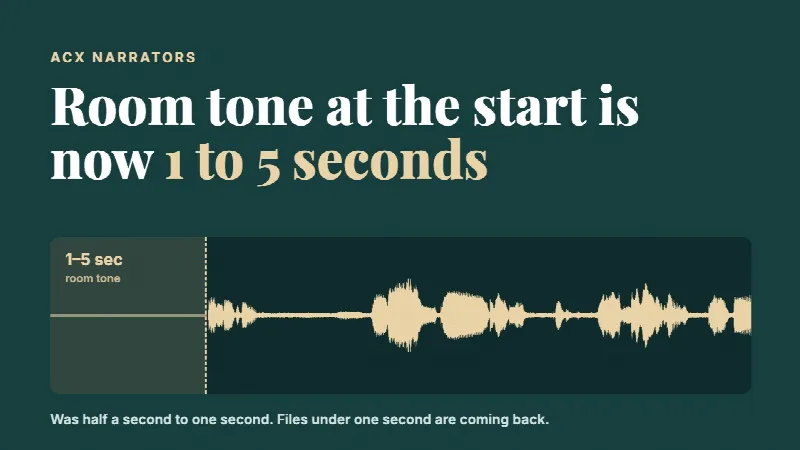
ACX changed its room tone rule. Every audiobook file now needs 1 to 5 seconds of room tone at the beginning and 1 to 5 seconds at the end. The beginning used to be half a second to one second. If your head is under one second, ACX will send the file back. Add a little over a second of room tone to the start of each file.
This one caught us. We were publishing books for Academy Voices this week, and ACX started kicking files back that would have gone through without a problem a few days earlier. Angela messaged me and said they want one to five seconds at the beginning. And I told her no, you read that wrong, it's on the end. She said no, it's on the beginning. So I went and looked, and she was right. They changed it, and as far as we can tell they changed it in about a day without really telling anybody.
We talked about it on the Academy Voices live with Gabby and Angela, along with a few other things going on with ACX and Audible right now.
The room tone part of the live starts at 28:09 in the replay on YouTube.
This is what changed for ACX narrators and how to fix your files so they don't bounce.
What exactly did ACX change?
For as long as I've been doing audiobooks, the rule was a little bit of room tone at the head and a little more at the tail. Half a second to one second at the start. One to five seconds at the end. Room tone, meaning the sound of your booth with nobody talking, not dead digital silence.
Now the start matches the end. One to five seconds at the beginning, one to five seconds at the end.
| Where in the file | Before (until early Oct 2026) | Now |
|---|---|---|
| Start of the file | 0.5 to 1 second | 1 to 5 seconds |
| End of the file | 1 to 5 seconds | 1 to 5 seconds (no change) |
So if you've been trimming your heads tight, which a lot of us do because we want the listener hearing a voice right away, those files are now too short at the front.
Why are my ACX files getting rejected for room tone?
If you uploaded files that passed last month and suddenly ACX is sending them back, this is very likely it. Your head room tone is under one second.
That's exactly what happened to us. Nothing else about the files had changed. Same booth, same chain, same editing. The only thing that was different was the rule.
And if you've got an editing template or a batch script that trims the start of every file to half a second, it's going to keep making files ACX won't take until you change it. Fix the template once and you don't have to think about it again.
The Author Audiobook Checklist
What it costs, how to choose a narrator, the three ways to pay, and what happens after you publish.
How much room tone should I put at the start now?
I'd go a little over one second. Not four and a half.
The rule says one to five, so technically you could put five seconds of nothing at the front of every chapter. I can't imagine doing that. Think about the person listening. They press play, and then they sit there for four or five seconds wondering if the file is broken. I'm still a firm believer that you want them hearing your voice as quickly as possible.
So what we did on our end is set it to about a second and a little smidge. That clears the one-second minimum with some breathing room, and it still gets to the voice fast. If you're worried about your editing software rounding or a fade eating a few milliseconds, give yourself 1.2 to 1.5 seconds and you're safe.
The end hasn't changed. Most people leave two or three seconds at the tail, and that's still fine.
How do I add room tone to the start of my files?
The easy way is to record a good chunk of room tone at the start of every session. Thirty seconds or so of just your booth, mic open, you not moving. You'll use it for this and for patching gaps.
Don't use digital silence for this. ACX wants room tone, and a jump from your booth sound to absolute zero and back again is something people can hear on headphones. It's also the kind of thing that gets flagged.
If you've already got a whole book edited, you don't have to re-edit anything. You're only adding a second of room tone to the front of each file. In most editing programs that's a few minutes of work, or one batch process.
Does the Academy Voices audio checker handle this?
Yes. We updated it as soon as we found out. The checker now flags any start under one second, and the fixer pads the start of each file to a little over a second for you. Run your files through it before you upload and the head is taken care of along with everything else it checks.
The checker is free for anyone with an Academy Voices account, and it works on files you're sending to ACX too.
What are the other ACX audio requirements?
The room tone rule is the only thing that changed, as far as we know. Everything else is the same as it's been. Here's the list from ACX's own audio submission requirements page, as of October 2026, so you can check your whole file in one go.
| Requirement | What ACX asks for |
|---|---|
| Room tone at the start | 1 to 5 seconds (this is the new one) |
| Room tone at the end | 1 to 5 seconds |
| Loudness | between -23 dB and -18 dB |
| Peaks | no higher than -3 dB |
| Noise floor | -60 dB or quieter |
| File format | MP3, 192 kbps or higher, constant bit rate, 44.1 kHz |
| Files | one chapter or section per file, each under 120 minutes |
| Mono or stereo | all files the same |
| Retail sample | its own file, 5 minutes or less |
Checked against ACX's requirements page, October 2026.
What else gets ACX files sent back?
Room tone is the one that changed, but it isn't the only reason files bounce. While you're fixing your heads, it's worth a quick pass on the other things ACX checks on every upload.
Credits are a big one. Your opening credits have to name the book and everyone who made it, and they have to match what's on the cover and the book's listing. Your closing credits have to tell the listener the book is over. The usual way is to say "You have been listening to" followed by the same credits again, and then "The End." The opening and closing credits each go in their own file.
Each file holds one chapter or section, and nothing longer than 120 minutes. If a chapter runs long, split it in two. Give the second part its own header so the listener knows where they are.
Then listen for extra sounds. Plosives and mic pops get noticed. So do mouse clicks and heavy mouth noise. Listen for outtakes you forgot to cut, too. And keep the levels and spacing the same from one file to the next. A book that sounds different from chapter to chapter is distracting, even when every single file passes the numbers.
Do other distributors want the same room tone?
From what we've seen, yes. Authors Republic asks for 1 to 5 seconds too, and they've flagged a start that was only about half a second. So if you publish wide like we do, a little over a second at the head and two or three seconds at the tail works everywhere we send books.
Why did ACX change the room tone rule?
Honestly, we don't know. They didn't say anything that we saw. We only found out because our files got sent back.
On the live, we kicked around a few guesses. Someone in the chat said it could make playback less jarring for people who listen at one and a half speed. Maybe. But that's a small group of listeners to change every single audiobook for. And the timing is interesting, with everything else going on at Audible right now, like the royalty changes. I'm not going to pretend I know what's behind it. They could change it back just as fast as they changed it. If they do, I'll let you know.
What I do know is that if you narrate for ACX, you need to fix your heads today, because files are getting bounced right now.
Is there an alternative to ACX for narrators?
This is why we built Academy Voices. Every narrator and every author on it is approved by a real person, I look at every profile myself, and there's no synthetic narration on the platform. We're also about to open our own audiobook store. Narrators and authors will keep a lot more of every sale there than they do anywhere else.
If you narrate audiobooks and you're not on Academy Voices yet, come check us out.
And if you're newer to narration and want to learn the editing side of all this with real people, we have a free class week at VO Journey Academy, 12 to 15 October. Come sit in on the live classes.
Questions people ask about the ACX room tone change
Is it 1 second or 1 to 5 seconds of room tone at the start for ACX?
It's 1 to 5 seconds now. It used to be half a second to one second. Anything under one second at the start can get the file sent back.
Did the end of file room tone change?
No. It's still 1 to 5 seconds at the end.
Can I use silence instead of room tone?
Use room tone, the natural sound of your booth. Digital silence can be heard as a dropout on headphones, and ACX asks for room tone.
Do I need to re-record my audiobook?
No. You only need to add a little room tone to the front of each file. Nothing about your performance or the rest of your edit has to change.
Does this apply to my retail sample?
The rule is for the audiobook files you upload. Check ACX's page for the retail sample. We'd keep the sample tight and get to the voice quickly either way.
How do I fix a whole book at once?
Use your editor's batch process to add room tone at the head of every file, or run the files through a checker that adds it for you, like the Academy Voices audio checker.
Anthony
The Author Audiobook Checklist
What it costs, how to choose a narrator, the three ways to pay, and what happens after you publish.